Overview
On Telegram, customers write to a bot. You create the bot in Telegram, then give RevoplyAI the bot's token so the assistant can answer as that bot.
The RevoplyAI screens were checked up to Save. Saving with a real bot token, the last step, was not run while writing this guide.
What you will achieve
- Create a Telegram bot and copy its token.
- Connect the bot to RevoplyAI.
Who this guide is for
Businesses that serve customers on Telegram.
Before you start
- A Telegram account.
- A bot token from @BotFather, or a few minutes to create one.
Get a bot token from Telegram
Telegram's own guide explains this in full: core.telegram.org/bots/tutorial.
Step 1: Create the bot with @BotFather
In Telegram, open @BotFather and send /newbot. Choose the bot's display name and a username ending in bot. BotFather replies with a token: a long code with a colon in it.
Anyone with the token can control your bot. Paste it only into RevoplyAI and never share it in a chat or a screenshot.
Connect it to RevoplyAI
Step 2: Open the Telegram card
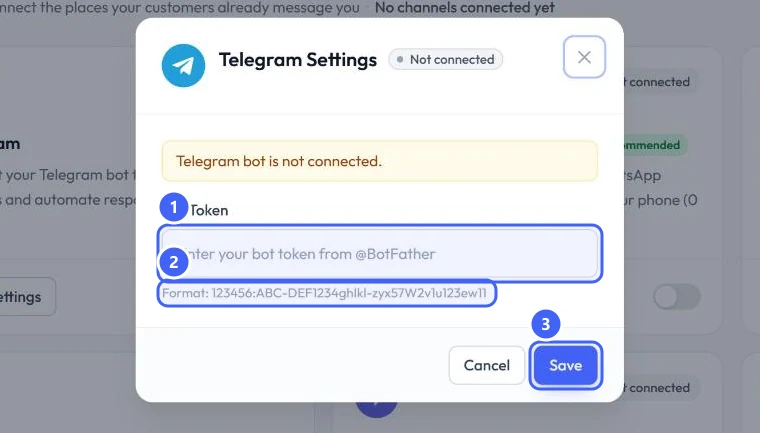
In Messaging Channels, select Settings on the Telegram card. The dialog says Telegram bot is not connected.
Step 3: Paste the token and save
Paste the token into Bot Token 1. It should match the format shown under the box 2. Select Save 3.
 Open full size
Telegram Settings.
- 1Bot Token
- 2The expected format
- 3Save
Expected result
The Telegram card no longer shows Not connected. Messages to your bot appear in the Inbox and the assistant answers them.
Troubleshooting
The token is not accepted.
Copy the whole token from BotFather, with no spaces before or after it. It has the form of numbers, a colon, then letters and numbers.
Still stuck?
A real person answers every message. Tell us the page you were on and what you saw.