Aug 26, 2026
AI Can Book Your Appointments in WhatsApp, No Calendar Needed
Booking, moving, and canceling an appointment all happen inside the WhatsApp thread, and the customer never has to leave it. There is no calendar account to link and no permissions to grant. The RevoplyAI assistant looks at your actual availability, suggests only times that are truly open, and confirms in whatever language the customer wrote in. The feature ships with the Pro and Business plans, and here is how it behaves from both ends of the chat.
What do you need to connect? Nothing.
The booking tools you have tried nearly all open with the same play: link your calendar, approve its permissions, then keep that connection alive afterwards. Our appointment feature skips past the whole move. The assistant works out availability from settings you define inside RevoplyAI (bookable hours, slot length, services) and keeps it in its own database. No external account appears anywhere in the flow, so nothing can break, expire, or drift out of sync. For a clinic or a salon, getting started means filling in one configuration screen a single time, not running an integration project.
How a customer actually books
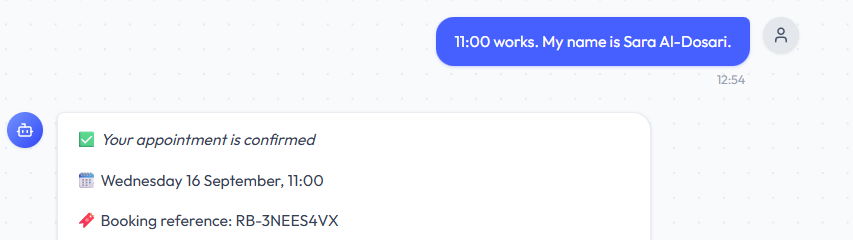
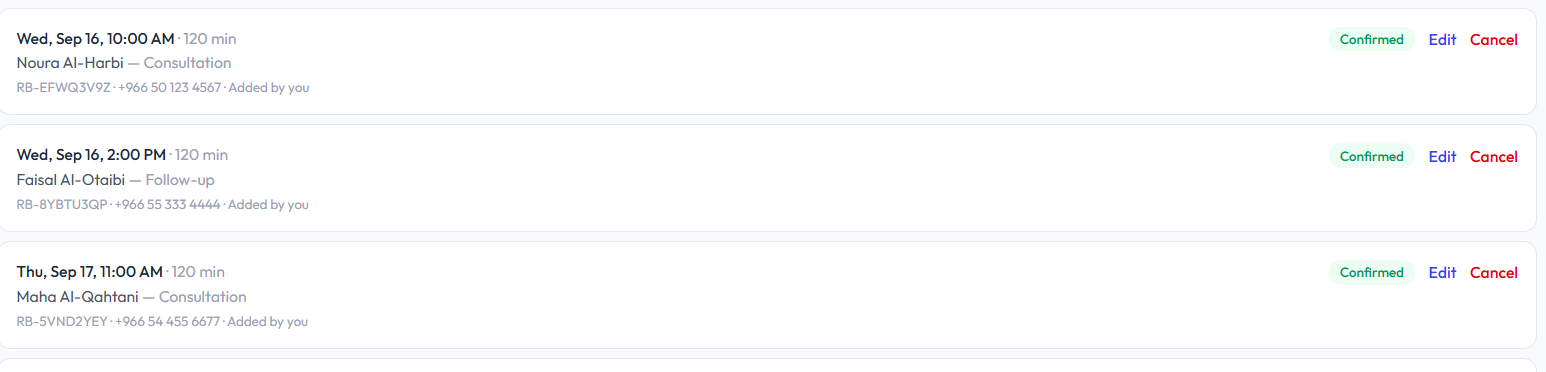
Follow the exchange step by step. Say a customer writes at 11pm on Wednesday asking for a Thursday afternoon slot. A human reply would wait until morning; the assistant instead checks the bookable hours for Thursday, deducts the appointments already confirmed, and comes back with concrete times: 2:00, 2:30, 3:30. The customer picks one, requests something earlier, or asks about another day. The assistant locks in the appointment and sends a short booking reference down the same thread. Your team receives a notification about the booking, and the appointment shows up on the Appointments page alongside the rest of the week.
That page does one more thing worth mentioning: bookings can also be entered there by hand. When someone calls or walks in, reception types it in, and it counts against availability exactly like any booking from the chat. The pool of slots stays one; there are simply two ways into it.
Setting the hours you can be booked in
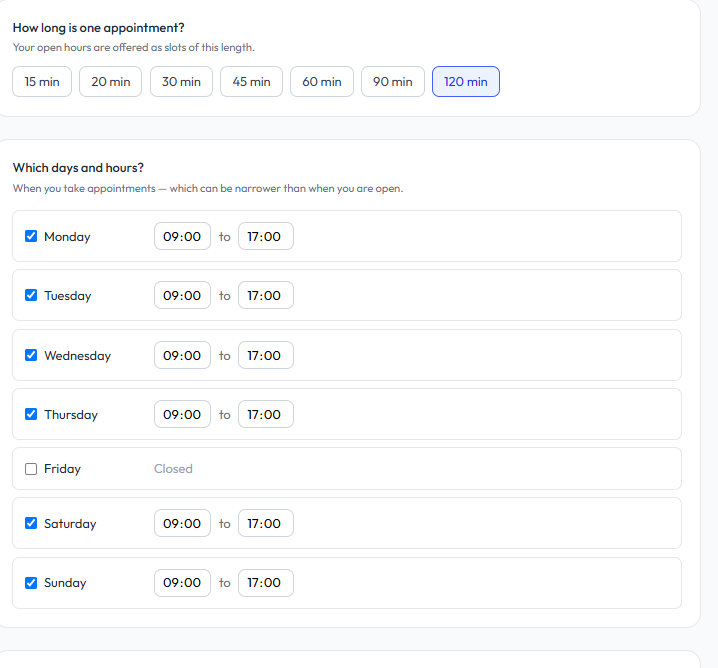
Everything above is driven by a small set of settings, configured a single time on the Appointments page. The defaults, along with what each one governs:
| Setting | Default | What it controls |
|---|---|---|
| Bookable hours | You set them | The times an appointment may actually occur, kept distinct from opening hours |
| Slot length | 30 minutes | How much of the day each appointment occupies |
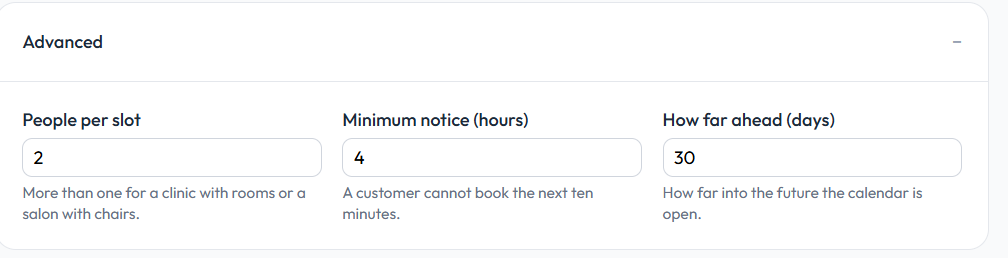
| Capacity per slot | 1 | Bookings that may share one slot; raise it to match rooms or chairs |
| Services | None | Every service listed on its own, with its own duration |
| Blackout dates | None | Entire days blocked from accepting bookings |
| Minimum notice | 2 hours | How near to a slot's start a booking is still accepted |
| Booking window | 30 days | How far into the future customers are allowed to book |
Four of these deserve a fuller explanation:
Bookable hours are not your opening hours
Opening hours say when the business is alive: the door stands open and the assistant answers as usual. Bookable hours form a tighter window: only the times when an appointment may genuinely take place. A dental clinic open 9 to 8 might accept bookings between 10 and 6 alone, leaving the margins of the day for walk-ins, paperwork, and lunch. The two settings stay separate, and the assistant will never suggest a time outside the bookable window, not mid-conversation, not even when the customer presses.
Slot length, and how many people fit in one slot
Each slot carries a length (30 minutes unless you change it) and a capacity. Capacity is where most booking tools go wrong, since they treat one slot as one person. A clinic with three treatment rooms can see three customers in the same half hour, while a solo dentist sees one. You set that figure once, and a slot stops being offered only when it is genuinely full, not the moment the first person claims it. Clinics tend to gain the most from this setting, and the remainder of that setup is covered in our guide on AI chatbots for clinics.
Services that don't all take the same time
A consultation is not a cleaning, and a trim is not a full color. Each service gets its own listing with its own duration, and the assistant books on that basis. A service that runs 45 minutes consumes 45 minutes of the day, and every slot offered afterwards accounts for what remains.
Blackout dates, minimum notice, and how far ahead people can book
Blackout dates shut down entire days: public holidays, Eid, a week of renovation. Minimum notice guards against the last-minute problem, and its two-hour default means a customer standing outside cannot insist on being seen within five minutes. The booking window decides how far ahead the calendar opens, 30 days out of the box. One working rule of thumb: a wide window fills slowly and accumulates reschedules, while a tight one manufactures urgency.
The booking reference, and what customers do with it
Each confirmed appointment comes with a short reference, delivered in the same conversation as the confirmation. That code alone lets the customer open the manage-booking page and reschedule or cancel on their own, with no account to create and nothing to install. The moment they move or drop the booking, the slot goes straight back into the open pool, and your team is notified of the change.
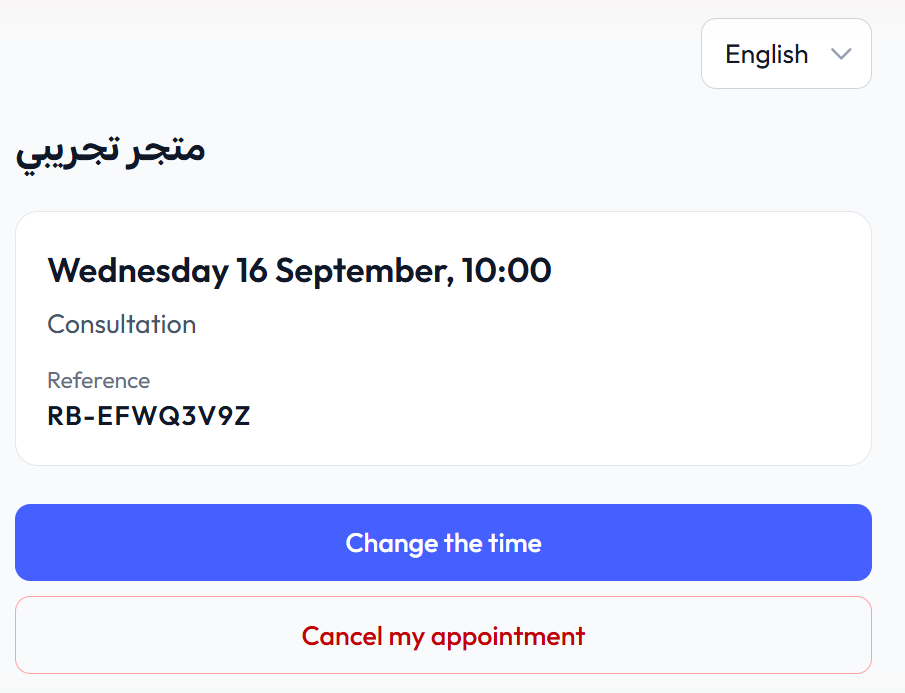
Here is the understated lever against no-shows. A customer whose plans shift at 10pm moves their own appointment rather than silently failing to appear, and the slot they release becomes bookable again within the same minute.
Which language does the confirmation arrive in?
Whatever language the booking was made in. Book in Arabic and the confirmation, the reschedule, and the cancellation notice all show up in Arabic. Change to English partway through the chat and the assistant changes with you. Nothing needs configuring for this. It is simply the language behavior the assistant already applies to every reply.
Can two customers take the same slot?
No. Availability is recomputed from the confirmed appointments, and that check runs at the database level rather than hoping two messages do not cross in flight. Should a slot fill between the assistant offering it and the customer confirming, the assistant says as much and presents the nearest alternatives. What the customer loses is the slot, not the conversation.
Which plans include appointment booking?
Pro ($29/month) and Business ($59/month) both include booking; Basic and Starter do not. On Pro it arrives bundled with knowledge base file and link uploads, reading customer photos, and five instant replies, while Business pushes instant replies to ten and lifts every limit further still. When your business sells appointments (clinics, salons, consultancies, anyone whose product is a timeslot), this feature usually settles the plan question. If answering questions is most of what you do, Starter remains the honest fit for now. On either plan, yearly billing gives two months free.
Why we built this instead of plugging into someone else's calendar
The intuitive route was an integration: hook up an external calendar, sync it in both directions, and display availability from it. Every booking product we examined began there, and our early prototypes walked the same road. The same wall kept appearing: most of our merchants had no digital booking calendar to plug into. Their appointments lived in a paper notebook, in the memory of the receptionist, or nowhere at all. An integration only serves businesses that already run a system.
So the calendar became part of the product. Availability is worked out from the merchant's own bookable hours minus the confirmed appointments, stored in our database, and editable by the team on the Appointments page. When appointment booking shipped in the September 2026 release, the setup instructions contained zero connect steps. That is the candid reason: a booking feature aimed at businesses without a booking system should not require one.
Frequently Asked Questions
A few of the questions we hear about booking in particular.
Do I need an external calendar account?
No. The entire booking flow runs inside RevoplyAI. You define the bookable hours, the assistant derives availability from them, and no external account ever needs creating or keeping connected.
What happens if someone tries to book outside my hours?
They receive real alternatives instead of a flat refusal. The assistant knows the bookable window, so a request for a dawn slot gets answered with the first times that are genuinely open. Requests of this kind cluster outside opening hours. Customers write the moment they remember, usually in the evening, and that is why answering customer messages after hours matters just as much as the booking itself.
Can customers book from Instagram or Telegram too?
Yes. The booking capability sits inside the assistant, and the assistant responds on all five channels: WhatsApp, Telegram, Instagram, Messenger, and the website widget. A customer who starts on Instagram and continues on WhatsApp holds onto the same conversation and the same appointment, and the manage-booking link works wherever it is received.