Overview
Everything in RevoplyAI happens in the dashboard at app.revoplyai.com. This guide takes you from the first screen to a signed-in dashboard, and covers what to do if you forget your password.
What you will achieve
- Pick the language the dashboard opens in.
- Create an account, or sign in to the one you have.
- Know where to reset a forgotten password.
Who this guide is for
Business owners and teammates opening RevoplyAI for the first time.
Before you start
- An email address you can open, or a Google or Apple account.
- A desktop or phone browser.
Choose your language
Step 1: Open the dashboard
Go to app.revoplyai.com. On your first visit the page asks you to choose a language before anything else.
Step 2: Pick English or Arabic
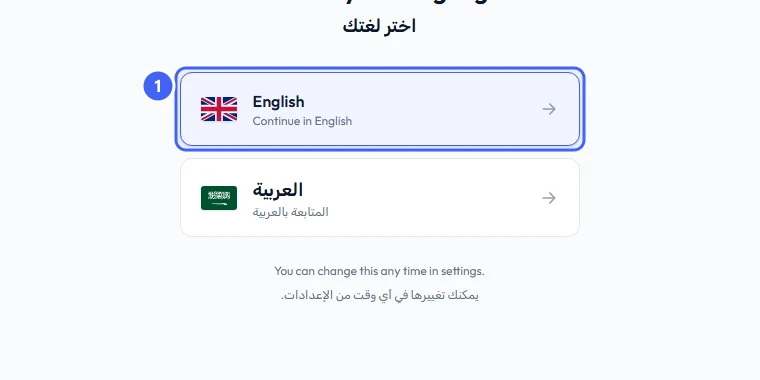
Select English or العربية 1. The whole dashboard, including menus and messages, follows this choice.
 Open full size
The first screen asks you to choose the dashboard language.
- 1The language options
You can change the language later from the language switch at the top of the dashboard, or in Account Settings.
Create an account
Skip this part if you already have an account.
Step 3: Open the sign-up form
On the sign-in page, select Sign Up under the Sign in button.
Step 4: Sign up with Google, Apple or email
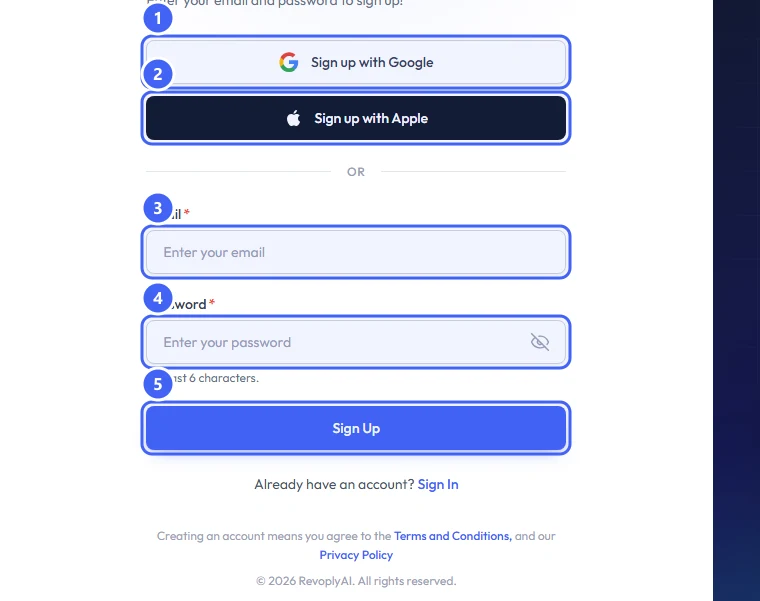
Select Sign up with Google 1 or Sign up with Apple 2 to use that account. To use an email address instead, enter it in Email 3, choose a Password 4 of at least 6 characters, and select Sign Up 5.
 Open full size
The sign-up form.
- 1Sign up with Google
- 2Sign up with Apple
- 3Email
- 4Password
- 5Sign Up
Creating an account means you agree to the Terms and Conditions and the Privacy Policy, which are linked under the form.
Sign in
Step 5: Sign in with the method you signed up with
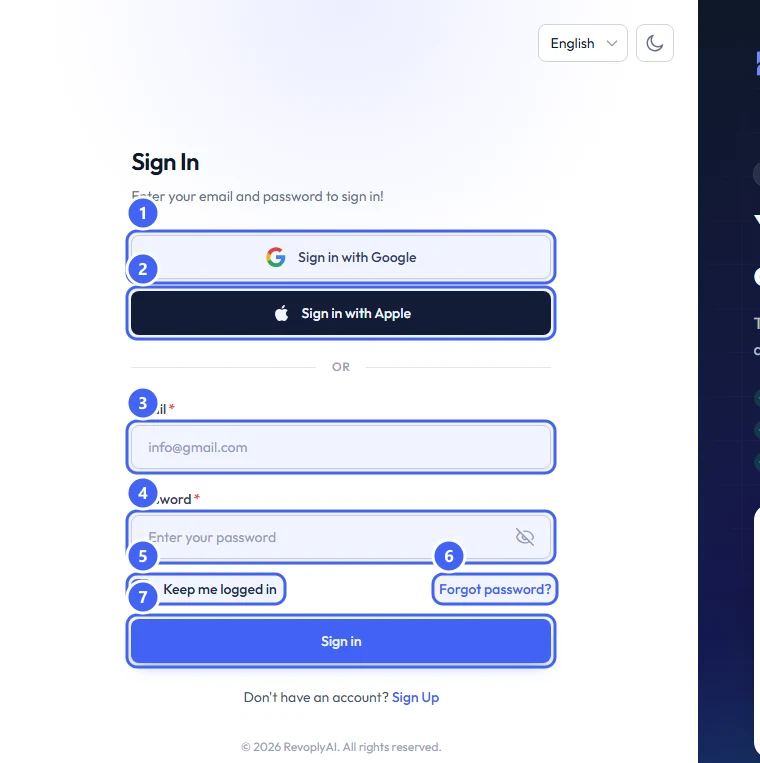
Select Sign in with Google 1 or Sign in with Apple 2, or enter your Email 3 and Password 4. Keep Keep me logged in 5 ticked only on a device that is yours. Then select Sign in 7.
 Open full size
The sign-in form.
- 1Sign in with Google
- 2Sign in with Apple
- 3Email
- 4Password
- 5Keep me logged in
- 6Forgot password?
- 7Sign in
Step 6: Reset a forgotten password
Select Forgot password? 6 and follow the email you receive. If you signed up with Google or Apple, sign in with that same button instead.
Expected result
The dashboard opens, and the Getting started page lists what is left to set up.
Troubleshooting
The page opens in the wrong language.
Use the language menu at the top of the sign-in page to switch between English and العربية.
I signed up with Google and cannot sign in with my email.
Sign in with the same button you signed up with.
Still stuck?
A real person answers every message. Tell us the page you were on and what you saw.