19 مايو، 2026
ما الذي تضعه في قاعدة معرفة الذكاء الاصطناعي وما الذي تتركه
ذكاء روبوت المحادثة يتحدد بما تغذّيه به من بيانات. فمن ينظّم قاعدة معرفته تنظيماً جيداً يحصل على ذكاء اصطناعي يجيب بدقة، ويتحدث بلسان علامته التجارية، ويحسم 80% من الاستفسارات بلا أي تدخل بشري. أما من يرفع المحتوى الخطأ أو لا يرفع شيئاً فينتهي بروبوت يشتّت العملاء ويقوّض ثقتهم. والفيصل كله في اختيارك لما تضمّنه.
في هذا الدليل نوضح لك بالتفصيل ما يليق بقاعدة معرفة الذكاء الاصطناعي، وما ينبغي إبقاؤه خارجها، والطريقة الصحيحة لصياغة المدخلات كي يحسن الذكاء الاصطناعي استخدامها.
ما الذي يجب تضمينه في قاعدة معرفة الذكاء الاصطناعي
الغاية من قاعدة المعرفة واضحة: أن تزوّد الذكاء الاصطناعي بكل ما يلزمه للرد على الأسئلة الحقيقية التي يطرحها عملاؤك. لذا ابدأ بحصر أكثر 20 سؤالاً يردّ عليه فريقك كل يوم، فهي أعلى مدخلاتك قيمة.
1. الأسئلة الشائعة
تأمّل الأسئلة التي يكررها فريق الدعم مرة بعد مرة. جهّز قائمة بأهم 20 سؤالاً، وصغ لكل واحد جواباً واضحاً مباشراً. فهذه القائمة هي أساس كل قاعدة معرفة ناجحة. ومن الأمثلة عليها: "ما طرق الدفع المتاحة؟"، "كيف أتتبع طلبي؟"، "هل يمكنني إرجاع المنتج بعد 30 يوماً؟"
2. وصف المنتجات والخدمات
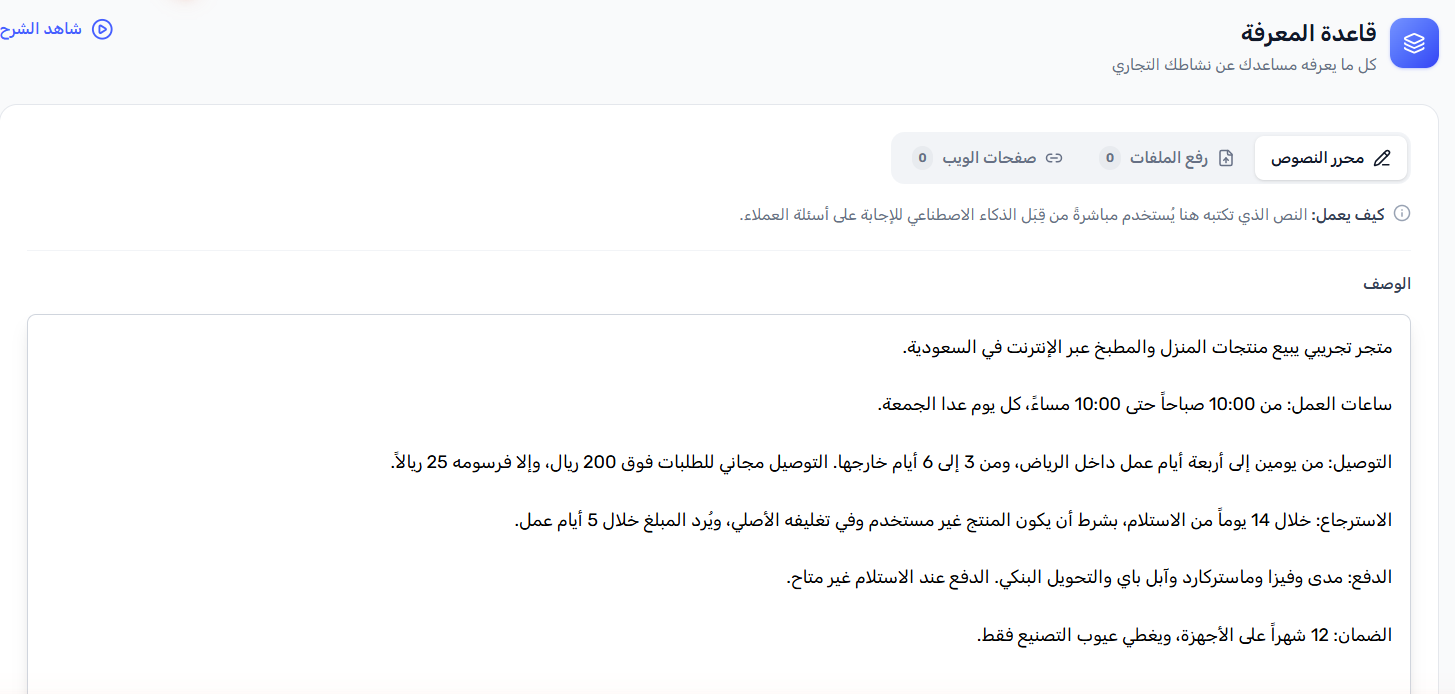
امنح كل ما تبيعه أو تقدمه وصفاً دقيقاً. والتزم التحديد: اذكر المواصفات التفصيلية، والمقاسات والألوان المتوفرة، والوزن والمادة والسعر، إضافة إلى أي قيود. فمدخلة مثل "نبيع الملابس" لا تنتج إلا جواباً غامضاً، بينما مدخلة مثل "القميص الكتاني الكلاسيكي متوفر بمقاسات S، XXL بألوان أبيض وبيج وكحلي. السعر: 149 درهم" تمنحك جواباً دقيقاً نافعاً.
3. سياسات الشركة
اكتب سياسات الإرجاع والاسترداد والتبديل والشحن بنصوصها الكاملة. فالعملاء لا يكفّون عن السؤال عنها، ولا يستطيع الذكاء الاصطناعي الإجابة بشكل صحيح إلا بتفاصيل دقيقة. غطِّ الشروط والمُهل الزمنية والاستثناءات والخطوات المتبعة، ودوّن نص السياسة نفسه بدلاً من الإحالة إلى وثائق خارجية.
4. أوقات العمل وطرق التواصل
حدّد ساعات العمل لكل يوم من أيام الأسبوع، وأضف العطلات الرسمية حيث يلزم. ولا تنسَ رقم واتساب وعنوان البريد الإلكتروني ورقم الهاتف والعنوان الفعلي إن كان موجوداً. هكذا لن يسأل العملاء الذكاء الاصطناعي عن معلومة يعجز عن العثور عليها.
5. أدلة استكشاف الأخطاء وإصلاحها
إن كانت منتجاتك أو خدماتك تتضمن جوانب تقنية، فضع في القاعدة أدلة استكشاف الأخطاء خطوة بخطوة لأكثر المشاكل شيوعاً. فعند توفر الدليل في قاعدة المعرفة، يقدر الذكاء الاصطناعي على حل مشاكل مثل "طلبي يظهر أنه تم تسليمه لكنني لم أستلمه" أو "لا أستطيع تسجيل الدخول إلى حسابي".
ما الذي يجب استبعاده
اختيار ما تستبعده لا يقل وزناً عن اختيار ما تضيفه. فالمحتوى الخاطئ لا يهدر المساحة وحدها، بل يهبط فعلياً بجودة ردود الذكاء الاصطناعي.
- وثائق الموارد البشرية والمالية الداخلية: أدلة الموظفين وبيانات الرواتب والإجراءات الداخلية لا مكان لها إطلاقاً في قاعدة معرفة يواجهها العملاء.
- الشروط القانونية المعقدة: الصياغات القانونية الكثيفة في الشروط والأحكام تُربك نماذج الذكاء الاصطناعي. فإن كانت سياسة ما مهمة، فأعد صياغتها بلغة مبسطة وأدرج هذا الملخص مكانها.
- الأسعار القديمة والمنتجات المتوقفة: المعلومة القديمة أضرّ من غياب المعلومة. فحين يقتبس الذكاء الاصطناعي سعراً منتهي الصلاحية تقع أمامك مشكلة خدمة عملاء. لذلك راجع قاعدة معرفتك مع كل تغيير في الأسعار أو المنتجات.
- مقارنات المنافسين: أبقِ التحليلات التنافسية خارج قاعدة المعرفة تماماً، وإلا قد يُظهر الذكاء الاصطناعي أسماء المنافسين في سياقات لا تريدها.
- المصطلحات الداخلية والاختصارات: لغتك الداخلية المختصرة لا تحمل أي معنى للعملاء. فاكتب المدخلات بالكلمات البسيطة ذاتها التي يستعملها عملاؤك.
كيف تكتب مدخلات قاعدة المعرفة بشكل يفهمه الذكاء الاصطناعي
حتى المعلومة الصحيحة، إن ساءت كتابتها، أخرجت ردوداً ضعيفة. وطبّق هذه المبادئ في كل مدخلة تكتبها:
- اكتب جملاً كاملة واضحة. النقاط المختصرة والاختصارات تصلح لملاحظات البشر، لكنها تؤدي أداءً ضعيفاً كبيانات تدريب للذكاء الاصطناعي. لذا استخدم جملاً تامة تذكر الحقيقة كاملة.
- حقيقة واحدة لكل جملة. كثرة الأفكار داخل الجملة الواحدة قد تدفع الذكاء الاصطناعي إلى التقاط جزء من المعنى فقط. واجعل كل عبارة مُركّزة على معلومة واحدة بعينها.
- لا غموض. تجنب عبارات مثل "عادةً" أو "أحياناً" أو "يعتمد على الوضع" ما لم توضح فوراً ما الذي يعتمد عليه، لأن غموضك سينعكس كما هو على العملاء في ردود الذكاء الاصطناعي.
- مصطلحات متسقة. المنتج الذي يُسمى "القميص الكتاني الكلاسيكي" يجب أن يُذكر بهذا الاسم في كل موضع. أما توزيع "قميص كتان" و"قميص كلاسيكي" و"القميص" بين مدخلات مختلفة فيفقد الذكاء الاصطناعي دقته.
متى تحدّث قاعدة المعرفة
قاعدة المعرفة ليست ملفاً تكتبه مرة واحدة ثم تنساه. فالدقة تتطلب إبقاءها محدّثة. لذا راجعها وجدّدها في الحد الأدنى كلما:
- تغيّر أي سعر
- أضفت منتجات أو خدمات جديدة
- طُرئ تحديث على السياسات
- بدّلت العطلات أو المواسم ساعات عملك
- وصلتك دفعة من الشكاوى المتشابهة عجز الذكاء الاصطناعي عن التعامل معها
بالنسبة لمعظم الشركات، تشكل المراجعة الفصلية نقطة انطلاق جيدة. أما الأعمال عالية الحجم التي تتغير منتجاتها باستمرار، فعليها المراجعة شهرياً أو مع كل تحديث جوهري في الكتالوج.
كيف تختبر جودة قاعدة المعرفة
قبل الإطلاق، مرّر ذكاءك الاصطناعي على أهم 10 أسئلة يطرحها عملاؤك. وصغ كل سؤال بالكيفية التي يصيغه بها العميل فعلياً، بلغته غير الرسمية وبأخطائه الإملائية. ثم قيّم كل رد:
- هل أصاب الرد الحقائق؟
- هل غابت عنه تفاصيل مهمة أم غطى كل شيء؟
- هل نبرته توافق هوية علامتك التجارية؟
- هل أجاب عمّا سُئل حقاً، لا عن مجرد الكلمات التي تضمنها السؤال؟
وأي رد لا يرتقي للمستوى المطلوب، عُد إلى مدخلة قاعدة المعرفة التي تقف خلفه وحسّنها. أكمل التفاصيل الناقصة، وأزل العبارات المبهمة، ثم أعد الاختبار. وحافظ على هذه الدورة من السؤال والتقييم والتحسين طوال الأسبوعين الأولين بعد الإطلاق.
وحين ينطلق ذكاؤك الاصطناعي، تعرض لك لوحة تحكم RevoplyAI كل محادثة، ومنها الحالات التي أعلن فيها الذكاء الاصطناعي أنه لم يجد إجابة. وتلك الفجوات ترسم لك بدقة خارطة الطريق لما تضيفه تالياً.
ومن أوائل ما يلاحظه أصحاب الأعمال ميزة الردود خارج أوقات العمل فما دامت قاعدة المعرفة مزوّدة جيداً، ستُجاب استفسارات الليل إجابات صحيحة دون أن يكون أحد من فريقك مستيقظاً.
شاهد: كيف تضيف المحتوى لقاعدة معرفتك
يبيّن لك هذا الشرح المختصر بدقة طريقة إضافة معلومات نشاطك إلى RevoplyAI عبر رفع ملفات PDF وWord. بينما يغطي ما تبقى من المقال المسار الآخر: الكتابة مباشرة داخل محرر النصوص.
أسئلة شائعة
كم عدد المدخلات التي تحتاجها قاعدة المعرفة لتعمل بشكل جيد؟
لا يوجد رقم محدد، غير أن أغلب الشركات تجني نتائج قوية من 30 إلى 60 مدخلة متقنة الصياغة تغطي الأسئلة الأكثر تكراراً والمنتجات الأساسية والسياسات الرئيسية. فالجودة ترجح على الكمية رجحاناً كبيراً، وعشر مدخلات دقيقة واضحة تتقدم على 100 مدخلة غامضة أو قديمة.
هل يستطيع الذكاء الاصطناعي التعامل مع أسئلة غير موجودة في قاعدة المعرفة؟
وكيل الذكاء الاصطناعي المُهيَّأ كما ينبغي يخبر العميل بصراحة أنه لا يملك تلك المعلومة، ويقترح نقله إلى موظف بشري، عوضاً عن التخمين أو تأليف إجابات. وهذا هو السلوك الصائب بعينه. وحين ترى هذه الفجوات في سجل المحادثات، فستعرف بدقة ما الذي تحتاج إلى إضافته تالياً.
هل أرفع كتالوجات PDF أم أكتب المدخلات يدوياً؟
كلا المسارين جائز، إلا أن المدخلات المكتوبة يدوياً تعطي باستمرار ردود ذكاء اصطناعي أفضل. فملفات PDF المنسقة للطباعة كثيراً ما تحمل تخطيطات وعناوين وجداول يصعب على الذكاء الاصطناعي تحليلها بنظافة. وإن اخترت ملفات PDF، فاجعلها غنية بالنص وحسنة التنظيم. أما الأمور الحساسة كالأسعار والسياسات والأسئلة الشائعة، فاكتب مدخلاتها بنفسك نصاً عادياً.
هل تريد رؤية هذا التطبيق عملياً في قطاعك؟ تصفّح حلول شات بوت الذكاء الاصطناعي حسب القطاع فكل صفحة تعرض قائمة قاعدة المعرفة الدقيقة لذلك النوع من الأعمال.